هل سيكفي المال؟
هل سيكفي بعد ثلاثة أشهر؟ متى ينفد الاحتياطي؟ ماذا يحلّ بالرصيد إذا نمت المصروفات أو غابت الإيرادات فترة؟ يمضي Cashflow بالنموذج إلى الأمام ويُظهر اللحظة التي يتوقّف فيها المال عن الكفاية.
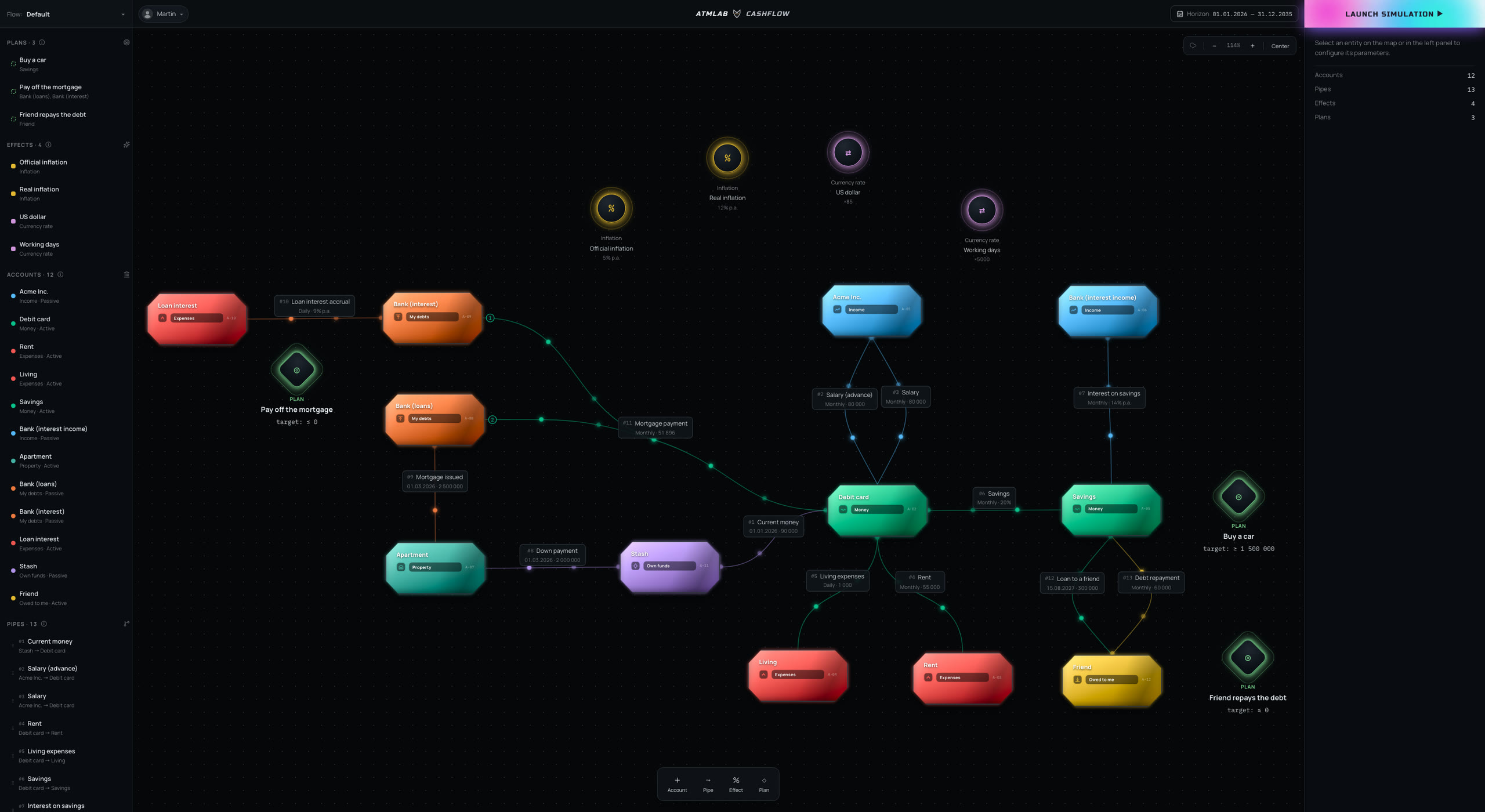
الحسابات تحفظ المال، والأنابيب تنقله بينها.
افتح أي تاريخ على الخط الزمني لترى حالة الحسابات والربح والخسارة.
غيّر القواعد التي تحرّك المال وانظر نسخة أخرى من مستقبلك.
قارن الإيرادات والمصروفات والربح والخسارة بين الطرق المختلفة التي قد يتحرّك بها المال.
هل سيكفي بعد ثلاثة أشهر؟ متى ينفد الاحتياطي؟ ماذا يحلّ بالرصيد إذا نمت المصروفات أو غابت الإيرادات فترة؟ يمضي Cashflow بالنموذج إلى الأمام ويُظهر اللحظة التي يتوقّف فيها المال عن الكفاية.
ماذا لو وظّفت ثلاثة أشخاص آخرين، أو افتتحت فرعاً جديداً، أو أخذت قرضاً؟ أضف التغيير إلى النموذج وانظر كيف يؤثّر في الأرصدة المقبلة والمصروفات والإيرادات والدين.
هل الرهن العقاري أفضل من الإيجار؟ ما الذي يتغيّر إذا سدّدت جزءاً من القرض كل ستة أشهر؟ ماذا ينتج عن وديعة بإيداعات منتظمة؟ قارن السيناريوهات وانظر إلى أين يقود كلٌّ منها بعد سنة، أو خمس، أو عشرين.
كم سيكون في حساب بعينه بعد ستة أشهر أو سنة أو خمس؟ كيف يتغيّر المبلغ بعد تطبيق التضخّم أو نسبة فائدة؟ كم هو المتاح في لحظة بعينها؟ يجيب النموذج عند أي نقطة زمنية تختارها.
هذه ليست حاسبة تجيب عن سؤال ثم تنساه. أنت تبني نموذجاً لواقعك المالي أنت: أين يقع المال، وكيف يتحرّك، ومتى تقع العمليات، وما الذي يؤثّر فيها. ثم يمضي النموذج إلى الأمام، وتُقرأ حالة كل حساب عند أي تاريخ.
وهذا ما يجعل القرار قابلاً للاختبار قبل اتخاذه. غيّرت راتباً، أضفت قرضاً، أزحت دفعة، خطّطت لشراء كبير؟ تُغيّر القاعدة، فيُعاد حساب المستقبل كلّه معها، ويمكن إبقاء النسختين جنباً إلى جنب.
تشغيل Cashflowأين يقع مالك والتزاماتك
تصف الحسابات أين المال، ولمن تَدين، ومن يَدين لك. الأصول السائلة وغير السائلة، والذمم المدينة والدائنة، وحقوق الملكية، والإيرادات والمصروفات تُحفظ منفصلة.
القواعد التي تحرّك المال
يربط الـ pipe مصدراً بمستقبِل ويحدّد الحركة. وقد يكون المبلغ مبلغاً ثابتاً أو حصّة أو نسبة فائدة أو صيغة تعتمد على حسابات أخرى.
متى تقع العمليات بالضبط
لكل pipe جدوله الزمني. وقد تتبع الدفعات قواعد مختلفة، والجداول تُدمج ببعضها أو تُطرح من بعضها. وتُعاد التواريخ إلى الحساب وأنت لا تزال تبني النموذج.
كيف تتغيّر قيمة المال مع الزمن
يعيد التضخّم والتحويل صياغة المبالغ وفق الشروط التي تختارها. المعاملات تضبطها أنت، لذلك ينفع هذا لا للعملات وحدها بل لوحدات قياس أخرى كذلك.
إلى أين يفترض أن يوصلك نموذجك
تربط الخطة هدفاً مالياً بحساباتك. حدّد دفعة أولى لتاريخ بعينه أو احتياطياً يعادل مصروفات عدة أشهر، ثم تحقّق هل يوصلك التركيب الحالي إلى هناك فعلاً.
نسخة مستقلّة من مستقبلك المالي
يحتوي الـ flow الواحد على نسخة كاملة من النموذج. أنشئ عدّة نسخ وقارن بينها: قرارات مختلفة بشأن قرض، أو إنفاق، أو استثمارات، أو شراء كبير.
لا يتوقّف Cashflow عند تاريخ واحد. يحسب النموذج حركة المال عبر الزمن، فتستطيع فتح أي لحظة ورؤية ما كانت الحسابات تفعله عندها بالضبط.
هكذا يُختبر القرار قبل اتخاذه. أضف عملية أو غيّر قاعدة، شغّل النموذج من جديد، وسيظهر المستقبل الجديد في الحال.
انظر إلى حالة أموالك عند أي تاريخ تختاره، أو عند لحظة عملية بعينها. يظهر كم كان هناك من مال ومن دين، وما الذي تراكم للوصول إلى تلك النتيجة.
من أين يأتي المال، وإلى أين يذهب، وكيف تتغيّر الحركة مع الزمن. ويمكن تتبّع العمليات فرادى، فيتّضح ما الذي يصوغ الرصيد المقبل.
أرصدة كل حساب، والإيرادات والمصروفات، والربح والخسارة، والدين، وحقوق الملكية، والأصول. كل رقم مشتقّ من النموذج نفسه.
يضع النموذج علامة عند اللحظات التي لا يكفي فيها المال المتاح للحركات التي خطّطت لها. تظهر الفجوة مسبقاً، ويمكن تجريب طرق مختلفة لسدّها.
قارن المبالغ كما هي وبعد تطبيق معاملاتك. يظهر كم تساوي مبلغاً ما لاحقاً، أو إلى ماذا يتحوّل بعد التحويل.
ابنِ عدة نسخ من المستقبل وضعها جنباً إلى جنب: إيجار مقابل رهن عقاري، أو قرض بسداد مبكّر مقابل الجدول المعتاد، أو بضعة اتجاهات قد يسلكها العمل.
يناسب Cashflow من تمتدّ قراراته المالية إلى أبعد من اليوم.
يستطيع نمذجة رأس المال والعائد.
يستطيع اختبار كيف تتطوّر الشركة.
يستطيع النظر في عواقب القرار قبل اتخاذه.
يستحقّ مكانه حيثما تتألّف الصورة المالية من أحداث كثيرة مترابطة. فبدل حاسبات وجداول متفرّقة، يدخل كل شيء في نموذج واحد وتظهر النتيجة عبر الزمن.
لا. يشغّل Cashflow في داخله نموذج حساب معقّداً، لكن ما يصل إلى الشاشة بسيط: حسابات ومال وأرصدة وإيرادات ومصروفات ودين. مفردات المحاسبة لا تلزمك في أي لحظة.
نعم. يمضي النموذج إلى الأمام، ويمكن أخذ لقطة عند أي تاريخ: بعد أشهر، أو سنة، أو خمس، أو أبعد.
نعم. كل نسخة تعيش في flow خاص بها. قارن الإيجار بالرهن العقاري، أو شروط قروض مختلفة، أو بضعة اتجاهات للعمل، وانظر إلى أين يقود كلٌّ منها.
نعم. في النموذج تأثيرات للتضخّم والتحويل. المعاملات تضبطها أنت، فتُعاد صياغة المبالغ عبر الزمن وتُنقل إلى أي مقياس تريده.
نعم. تُوصف الحركة بالـ pipes، وقد يحمل الـ pipe مبلغاً ثابتاً أو حصّة أو نسبة فائدة أو صيغة مبنية على حسابات أخرى. وتصير الاستحقاقات والإيداعات جزءاً من النموذج نفسه.
لا، ولا يوجد استيراد مصرفي في Cashflow. أنت من يُدخل النموذج، والنظام يحسب منه حركة المال وحالة الحسابات المقبلة.
ابنِ نموذجك المالي واختبر قراراتك في مواجهة المستقبل الذي ينتجه. Cashflow مجاني ما دام المنتج في مرحلة بيتا.
تشغيل Cashflow